For Google Ads agencies
A daily analyst you can talk to, for every Google Ads account you manage.
Every morning it emails a plain-language audit of each account: what changed and what to check. All day, message it to ask a follow-up, answered from live read-only queries.
- Read-only access
- No account changes
- One report per account per day
Trusted by teams at




Reporting across Senior living, Home services, Legal, Health clinics, family entertainment, and more.
Your morning
The same 7:00 AM, two ways.
Twelve accounts before your first meeting is a different morning depending on how you read them.
- Log into twelve accounts, one at a time.
- Pull yesterday's numbers and try to remember what normal looked like.
- Run out of morning before you reach the last four.
- Read twelve verdicts over coffee, one email per account.
- See what changed and what to check, already written up.
- Message the bot to dig into the two accounts that need you.
Telegram agent
Ask about any account in plain language.
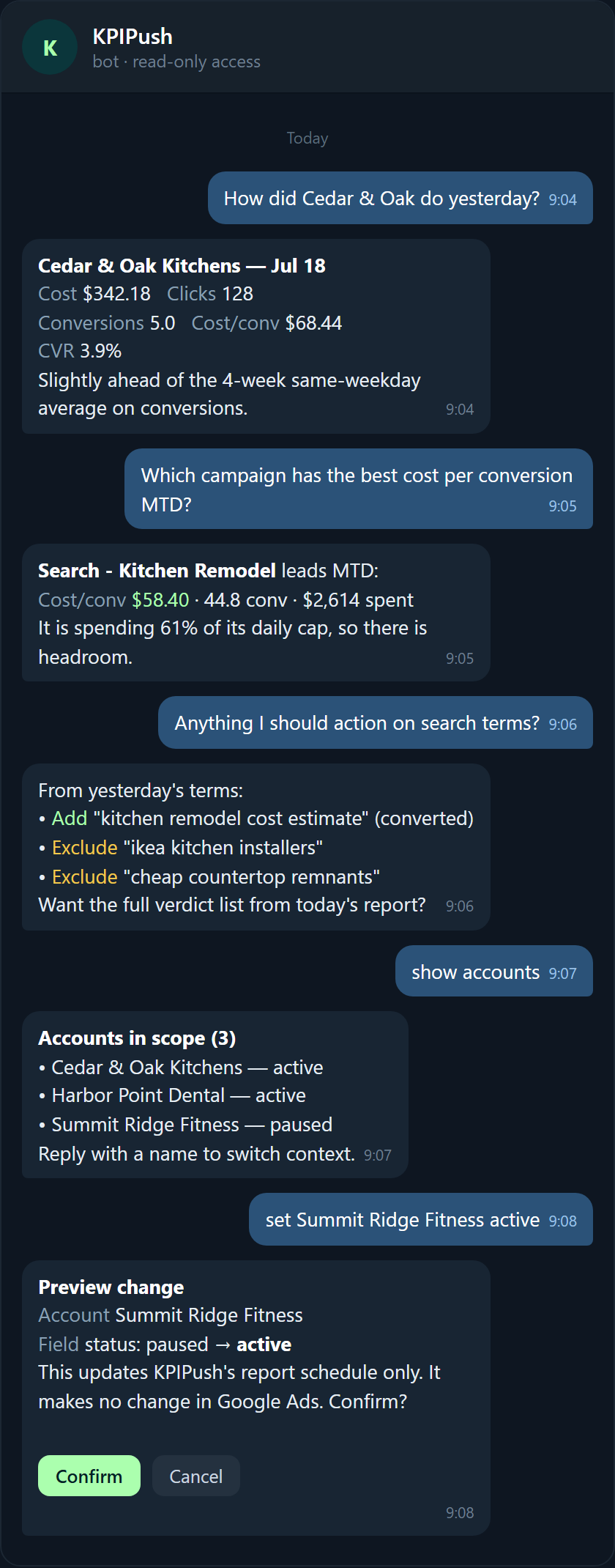
Between reports, message the KPIPush bot to ask how an account did, which campaign is most efficient, or what to action, answered from live read-only queries and never a write.
How it works
Connect an account once. Read the audit every morning.
Connect a Google Ads account
Grant read-only access through Google's standard OAuth flow. It never changes your campaigns or budgets.
It audits, every morning
KPIPush queries the account, compares yesterday against your baselines, and checks pacing and search terms.
You get one email per account
Action items first, then the numbers, then a written audit that separates signal from noise.
After you connect
From connected to your first report by tomorrow morning.
You connect
Grant read-only access through Google OAuth. Takes a couple of minutes per account.
That night
KPIPush runs its first pull and audits the account against its own recent history.
Next morning
Your first report lands in your inbox: action items, the numbers, and a written audit.
Every morning after
A fresh report per account, automatically, until you disconnect.
Daily reports
The numbers, framed against baselines that matter.
Every core metric is measured against your own recent averages and the same weekday over the last four weeks. See what each report covers.
Analyst audit
A written read, not just a dashboard.
Every report ends with a plain-language audit that separates noise from real trends, reads pacing against budget, and calls out what needs you.
Search term verdicts
Every notable search term gets a verdict.
KPIPush labels each one, add as a keyword, add as a negative, watch, or keep, with a one-line reason so the list is ready to action.
High-intent estimate query that already converted; give it its own keyword and bid.
Brand-specific install intent Cedar & Oak does not serve; exclude it.
Bargain-remnant shopper, off-profile for full remodels; exclude it.
Research-stage but relevant; no conversion yet, monitor before acting.
9 other terms reviewed: keep.
How it compares
A daily push, not another dashboard to check.
Most tools wait for you to log in and read charts. KPIPush sends a written read every morning and changes nothing in your account.
| Reporting dashboards | Audit platforms | Manual account reviews | KPIPush | |
|---|---|---|---|---|
| Delivery model | Pull: you log in | Pull: on request | Manual: you do it | Push: emailed daily |
| What you get | Charts to interpret | A periodic audit | Your own notes | Written audit + action items |
| Cadence | Whenever you look | One-off or monthly | When you find time | Every morning |
| Setup effort | Dashboards to build | Scoping per audit | None, but time-heavy | Connect once, read-only |
| Account changes | No | Sometimes | You make them | Never: read-only |
| Price posture | Per seat or usage | High per engagement | Your hours | Flat per account (early access) |
Testimonials
From the agencies we are building with.
“The morning report is the first thing I read now. I used to open accounts one by one and hope I hadn't missed anything. I know what moved before my first call.”
“What sold me was messaging it back. I can ask why a campaign dipped without logging in, and the answer comes from the actual account instead of a guess.”
“Read-only was the dealbreaker for my clients. It watches and reports, it never touches the account, and the daily note keeps me honest across a book I can't check by hand every day.”
Trust and security
Read-only by design. Your data stays yours.
Read-only access
KPIPush requests read-only Google Ads scopes and cannot change campaigns, budgets, or settings.
Only what a report needs
It stores the metrics and campaign, search-term, and change-history data used to build your reports. Nothing more.
Never sold or shared
Your Google Ads data is never sold and never shared for advertising. See the Privacy Policy.
Is KPIPush's access to my Google Ads account read-only?
Yes. KPIPush requests read-only Google Ads scopes through Google's standard OAuth flow. It can read reporting data but cannot create, edit, pause, or delete anything in your account.
Does KPIPush make any changes to my campaigns or budgets?
No. KPIPush only reads. It does not touch campaigns, budgets, keywords, bids, or settings. Every recommendation is yours to apply or ignore.
What Google Ads data does KPIPush read and store?
It reads and stores the data needed to build your reports: account and campaign metadata, performance metrics, conversions by action, search terms and Performance Max categories, budget pacing, and change history. It does not store your Google password; access is handled by OAuth tokens.
How do I connect a Google Ads account?
You grant KPIPush read-only access once through Google's OAuth consent screen. From then on it pulls the account automatically each day. You can revoke access at any time from your Google Account permissions.
How often are reports sent, and when?
One report per connected account, every morning, covering the previous day plus rolling weekly and month-to-date views. Delivery timing can be set to suit your timezone.
What does the AI decide, and what does it leave to me?
The AI reads the data and writes the analysis: it separates noise from trends, flags pacing and budget issues, and proposes verdicts on search terms. It does not act. Every change to your Google Ads account is left entirely to you.
What are search-term verdicts?
For each notable search term, KPIPush assigns a verdict, Add as keyword, Exclude, or Watch, with a one-line reason tied to that account. The verdict list is ready to action; KPIPush does not apply the changes itself.
Is my data sold or shared?
No. Your Google Ads data is never sold and never shared for advertising. It is used only to produce your reports, in line with the Google API Services Limited Use requirements.
Early access
We are onboarding a small number of agencies.
KPIPush is in early access before public launch. Leave your email and we will reach out as we open spots. Questions? Write to info@kpipush.com.