Features
Everything in the daily report, and the agent behind it.
KPIPush reads each Google Ads account once a day and turns it into a report you can act on in minutes. Read-only throughout. Here is what each part does.
Comparison ladder
The numbers against your own baselines.
Yesterday, the last seven days, and month to date, each measured against the baselines that make a number mean something: your recent daily average, last month, and the same weekday over the last four weeks.
- Cost, impressions, clicks, CPC, CTR, conversions, cost per conversion, CVR
- Partial-period comparisons are marked so you do not misread a mid-month total
- Colored deltas so the direction of each move is legible at a glance
Analyst audit
A written read of the day.
Every report ends with a plain-language audit written from that day's data. It separates a one-day blip from a real trend, reads pacing against budget, points to the campaigns carrying the account, and calls out anything in the change history worth a second look.
Search-term verdicts
A verdict on every term worth a decision.
KPIPush reviews the search terms that spent or drew clicks and labels each one: add as a keyword, add as a negative, watch, or keep. Each carries a one-line reason tied to that account, so the list is ready to action without re-checking the logic yourself.
High-intent estimate query that already converted; give it its own keyword and bid.
Brand-specific install intent Cedar & Oak does not serve; exclude it.
Bargain-remnant shopper, off-profile for full remodels; exclude it.
Research-stage but relevant; no conversion yet, monitor before acting.
9 other terms reviewed: keep.
Change-history monitoring
Know what changed, and who changed it.
The last 24 hours of edits, grouped by user and by type: budgets, bidding, targeting, assets. Account-level changes such as conversion actions and settings are counted separately, so a quiet account that suddenly saw 40 edits does not slip past you.
Budget pacing
Pacing and budget flags, before month-end surprises.
A projected end-of-month spend against the budget you set, plus per-campaign flags for lines spending under 70% or over their daily cap, with whether each is actually limited by budget.
Telegram agent
Ask about any account in plain language.
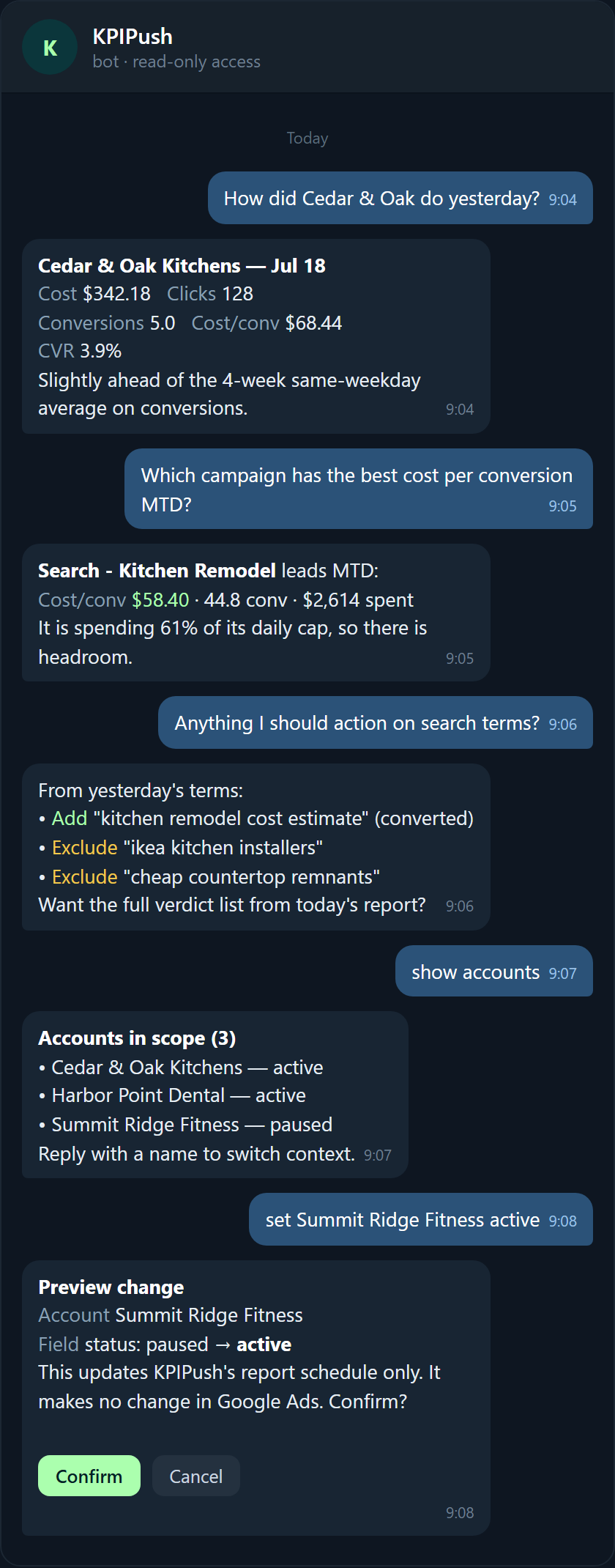
Between reports, message the KPIPush bot. Ask how an account did yesterday, which campaign has the best cost per conversion, or what to action on search terms. Answers come from live, read-only queries against the account.
You can also choose which accounts KPIPush reports on. Every change to KPIPush's own settings is previewed and confirmed first, and it never writes to Google Ads.
Delivery
One email per account, every morning.
Each account gets its own report, so a portfolio of ten accounts is ten focused emails, not one merged dashboard. Add teammates on CC where you want more than one set of eyes.
How it compares
Where KPIPush sits next to the alternatives.
Reporting dashboards show you charts when you log in. Audit platforms run a deep review now and then. Manual reviews depend on finding the time. KPIPush is the daily, written, read-only read in between, categorized here rather than pitched against any one product.
| Reporting dashboards | Audit platforms | Manual account reviews | KPIPush | |
|---|---|---|---|---|
| Delivery model | Pull: you log in | Pull: on request | Manual: you do it | Push: emailed daily |
| What you get | Charts to interpret | A periodic audit | Your own notes | Written audit + action items |
| Cadence | Whenever you look | One-off or monthly | When you find time | Every morning |
| Setup effort | Dashboards to build | Scoping per audit | None, but time-heavy | Connect once, read-only |
| Account changes | No | Sometimes | You make them | Never: read-only |
| Price posture | Per seat or usage | High per engagement | Your hours | Flat per account (early access) |
- Push, not pull: the report comes to you every morning instead of waiting for a login.
- Written, not just charted: an analyst-style narrative and action items, not only numbers.
- Read-only, always: it observes and reports; it never edits the account.
See it on a real report.
Read a full anonymized report end to end, or ask for early access.